
Fully-integrated CAD Layout, Analysis, and Optimization for all Aerospace Vehicle Concepts!
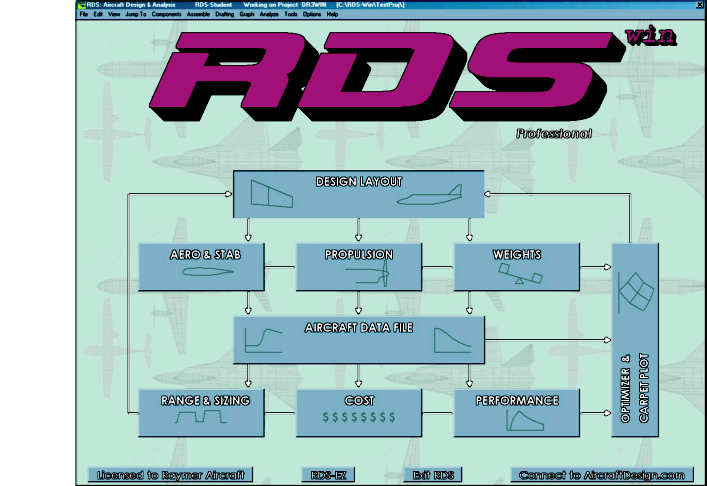
RDSwin lets you take an aircraft design from first conceptual layout through functional analysis, leading to performance, range, weight, cost results, and optimization. RDSwin is based on real industry methods and decades of personal experience, and represents 25+ years of evolutionary development. RDSwin follows the methods of Dr. Raymer’s best-selling textbook Aircraft Design: A Conceptual Approach, but enhanced and supercharged.
Powerful and flexible, RDSwin is over 120,000 lines of original code. It has over 600 pulldown menu commands plus on-screen buttons and hot keys, and a complete pop-up PDF user’s manual. RDSwin outputs analysis results and program data to popup boxes, text files, Windows printers, or directly to your spreadsheet, word processor, or internet browser. It has instant graphing capabilities, formatted results output, and much more.
RDSwin has its own, integral 3-D CAD module that was developed specifically for the design of new aerospace vehicles. It “knows what an airplane is” and has numerous features that allow rapid creation and modification of aircraft and spacecraft components. A new design can be developed in as little as an hour (1-2 days is more typical). Once the design is created, this Design Layout Module automatically extracts the important geometric information and loads it into the appropriate analysis module via an automatically-created RDS TAB file, which is also useful as a source of geometric information for reporting purposes.
RDSwin rapidly analyzes an aircraft’s aerodynamics, weights, propulsion, longitudinal stability, and cost, and performs mission sizing and range/loiter analysis. RDSwinhas complete performance analysis including takeoff, landing, rate of climb, Ps, fs, turn rate, and acceleration. RDSwin provides graphical output for drag polars, L/D ratio, thrust curves, flight envelope, range parameter, and more. The Professional version also has a built-in optimization capability including classic Carpet Plots and a full Multidisciplinary Design Optimization (MDO). RDSwin works equally well in Metric and FPS units, and all inputs and outputs – past and present – can be instantly switched from one to the other.
An experienced RDSwin user says, “RDSwin quickly provides mission results as accurately as a full-blown mission program. Given a couple of days and a simple picture, I can predict if our engine will provide the desired performance. This is a great improvement over our previous methodology.” – J. Turner, Principal Engineer- Powerplant Installations Analysis, Honeywell Engines & Systems
RDSwin comes in a full-featured Professional version and a reduced-capability Student version whose license agreement restricts its usage to educational purposes (including self-instruction). Click here for a viewgraph presentation of RDSwin and its capabilities, here for a detailed RDSwin writeup, here for sample illustrations from RDSwin design and analysis work, and here for a paper describing the mathematics used in the Design Layout Module.
For further information or to request a quote, contact Aircraft Design Research LLC